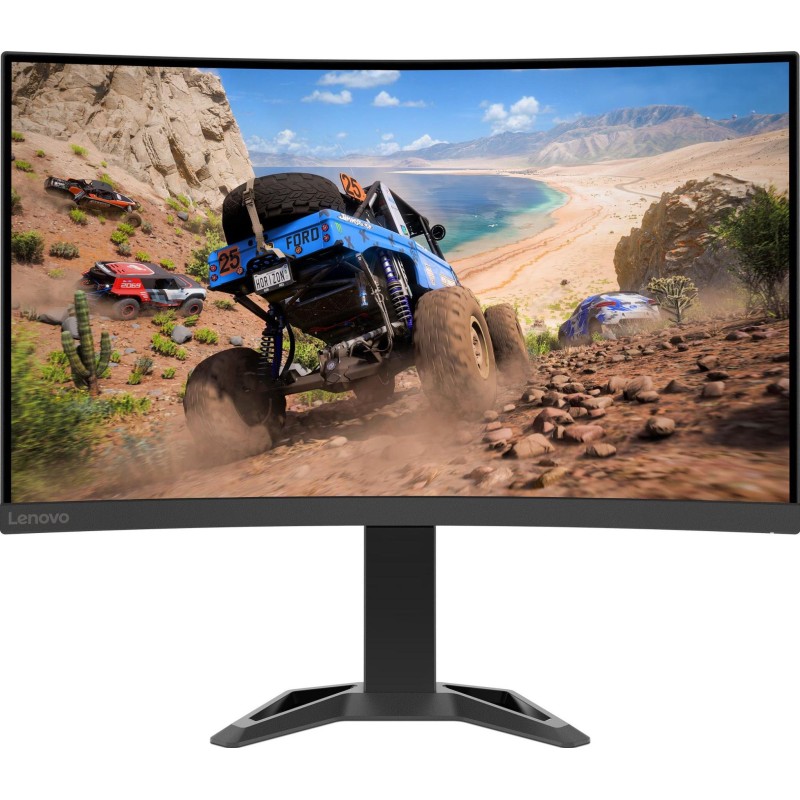
Lenovo G27qc-30

Version
Version
G27qc-30
Screen
Screen
685.8 mm, 27 in
Weight
Weight
4.2 kg, 9.26 lbs
Pixel Density
Pixel Density
109 ppi
Resolution
Resolution
2560 x 1440 pixels

Lenovo G27qc-30 Prices


Lenovo G27qc-30 Key Specifications


Brand
Lenovo
Model
Lenovo G27qc-30
Version
G27qc-30
Category
Displays
Released Date
2022
Screen
685.8 mm, 27 in
Pixel Density
109 ppi
Resolution
2560 x 1440 pixels
Weight
4.2 kg, 9.26 lbs

Lenovo G27qc-30 Technical Specifications


Product Overview

Brand
Lenovo
Alias
66F4GAC2
Model
Lenovo G27qc-30
Category
Displays
Version
G27qc-30

Design

ERGONOMICS

Features
  • VESA Mount
  • Detachable Stand
  • Adjustable Height
  • Forward and Backward Tilt
Height adjustment range
  • 135 mm
  • 5.315 in
Vesa mount size
100 x 100 mm

OPERATING ENVIRONMENT

Maximum altitude
  • 5000 m
  • 16404.2 ft

BODY

Height (shorter side)
  • 369.8 mm
  • 14.5591 in
Width (longer side)
  • 610.4 mm
  • 24.0315 in
Thickness
  • 3.4724 in
  • 88.2 mm
Weight
  • 4.2 kg
  • 9.26 lbs
Height with stand (shorter side)
  • 394.3 mm
  • 15.5236 in
Width with stand (longer side)
  • 610.4 mm
  • 24.0315 in
Thickness with stand
  • 239.2 mm
  • 9.4173 in
Weight with stand
  • 6.1 kg
  • 13.45 lbs
Box height (shorter side)
  • 463 mm
  • 18.2283 in
Box width (longer side)
  • 789 mm
  • 31.063 in
Box thickness
  • 162 mm
  • 6.378 in
Box weight
  • 8 kg
  • 17.64 lbs
Stand thickness
  • 239.2 mm
  • 9.4173 in
Colors
Raven Black

REGULATORY COMPLIANCE

Compliance
  • CCC
  • China Energy Efficiency Standard Tier 1
  • Eyesafe Display Certification
  • RoHS
  • TÜV Rheinland Eye Comfort
  • TÜV Rheinland Low Blue Light (Hardware Solution)
  • Volatile Organic Compound Certification
  • Windows 10)
  • Windows Certification (Windows 7

ADDITIONAL FEATURES

Additional features
Anti-theft stand lock slot - Kensington

ACCESSORIES

Accessories
DisplayPort cable

STORAGE ENVIRONMENT

Maximum altitude
  • 12192 m
  • 40000 ft
Temperature range
  • -20 °C - 60 °C
  • -4 °F - 140 °F

Display

Average response time
7 ms
Resolution (h x w)
2560 x 1440 pixels
Coating
Anti-glare/Matte
Screen area
88.74 %
Vertical viewing angle
178 °
Type
VA
Color depth
8 bits (6 bits + FRC)
Backlight
W-LED
Size
27 in
Resolution
  • Quad HD (QHD)
  • 1440p
Static contrast ratio
4000 : 1
Horizontal viewing angle
178 °
Minimum response time
4 ms
Pixel density
109 ppi
Brightness
350 cd/m²
Refresh rate (digital)
48 Hz - 165 Hz
Pixel pitch
  • 0.233 mm
  • 0.0092 in
Aspect ratio
  • 1.778:1
  • 16:9
Lut
8 bits
Curvature
  • 1500 mm
  • 59.0551 in
Height
  • 335.664 mm
  • 13.2151 in
Diagonal
  • 685.8 mm
  • 27 in
Width
  • 596.736 mm
  • 23.4935 in
Number of colors
  • 16777216 colors
  • 24 bits
Additional features
  • Frame rate control
  • Response time - 1 ms (MPRT - Motion Picture Response Time)

Internal Components

POWER

Maximum power usage
65 W
Average power usage
35 W
Power usage in sleep mode
0.5 W
Power usage when off
0.3 W
Voltage
  • 100 V - 120 V
  • 220 V - 240 V
Frequency
50 Hz - 60 Hz

SOFTWARE

Additional features
  • 3-side NearEdgeless Design
  • AMD FreeSync Premium
  • Flicker-free technology
  • HDR Decoding
  • Lenovo Artery
  • Natural Low Blue Light

AUDIO

Built-in speakers
2 x 3 W

Not available

Module
Front Camera
3D (Three-Dimensional) Display
3D Display
Left & right swivel
Left & Right Swivel
Landscape & portrait mode pivot
Pivot for Landscape & Portrait Mode
ThinkVision T27q-20
2560 x 1440 pixels
112 ppi
3.2 kg, 7.05 lbs
T22v-10
1920 x 1080 pixels
102 ppi
2.94 kg, 6.48 lbs
ThinkVision D24f-10
3840 x 2160 pixels
Tizen 4.0
81 ppi
16.8 kg, 37.04 lbs
T24v-10
3840 x 2160 pixels
Amazon Fire TV
90 ppi
14.3 kg, 31.53 lbs
ThinkVision T32h-20
2560 x 1440 pixels
93 ppi
6.78 kg, 14.95 lbs
S27i-10
1920 x 1080 pixels
81 ppi
4.22 kg, 9.3 lbs
ThinkVision E2323
3840 x 2160 pixels
Tizen 4.0
77 ppi
20.6 kg, 45.42 lbs

User Reviews for Lenovo G27qc-30


Share your thoughts!
Whether you own this device, have tried it before, or even just know about it from friends or reviews, we want to hear from you! Your input helps others understand the device better and make informed decisions. Don’t underestimate the value of your opinion—every comment matters and adds a personal touch that benefits everyone. Share your experience or insights now!
Your Name
Your Comment